For healthcare professionals
A clearer picture before the consultation.
Brisalia helps your patients record their symptoms, bleeding and treatment changes, and bring you a concise summary.
- What matters, on page oneHer main concern, how often and how strongly each symptom hits, every bleed, and the current dose with the doses she logged as taken, before you turn the page.
- Nothing for you to installNo account or software. She shows it on her phone, prints it or sends it to you.
- Free for your patientLogging and the report for the appointment cost her nothing.
Available on iPhone and Android. You can review the sample report before recommending it.
For clinicians supporting patients through perimenopause and menopause.
How to read the report
Numbers you can check
Period
Jul 28 – Oct 27, 2026
Days logged: 83 of 92
Before starting estradiol transdermal patch + micronized progesterone
| Symptom | Aug 15 – Sep 11 · 27 days logged | Last 4 weeks (Sep 30 – Oct 27) · 23 days logged |
|---|---|---|
| Hot flashes | 6.5 days/wk · mean 3.2/5 | 3.3 days/wk · mean 2.6/5 |
| Night sweats | 3.9 days/wk · mean 3.1/5 | 1.8 days/wk · mean 2.5/5 |
| Poor sleep | 2.9 days/wk · mean 2.7/5 | 2.1 days/wk · mean 2.6/5 |
Days per week with the symptom (counting only the days logged), and its mean intensity on those days. The report shows what she logged; it doesn't show whether one thing caused another.
- Frequency you can compare
- Days per week with the symptom, out of the days she logged. Each period shows how many days that was. With only one logged day, a calculated weekly rate doesn't mean seven days were observed: always read the rate alongside the number of days logged.
- Severity in her own words
- Her 1–5 rating of how much it affected her, averaged over the days she had the symptom.
- Gaps you can see
- Days she didn't log stay blank. They're never counted as symptom-free.
A symptom diary, not a validated scale like the MRS or Greene. Use it alongside your usual assessment.
More detail: comparisons, Apple Health, too little data, doses, yearly review
- Before and after
- The 4 weeks before a treatment start or dose change against her latest 4 weeks, for treatments she's still taking, started or changed in the last 12 months. If she started logging the day she started treatment, her first 4 weeks on it are used instead, and labeled as such.
- Apple Health data
- Symptoms imported from Apple Health are marked as such on the report, and days without a rating aren't counted in the averages.
- Too little data
- Each comparison needs at least 7 logged days in each window; otherwise the report says so instead of showing numbers.
- Doses
- She enters them. "Taken" is what she ticks: it isn't verified. Doses she didn't tick show as "not logged", never as missed.
- Before/after isn't cause
- It shows how her symptoms changed over time; it doesn't show the treatment caused the change.
- Yearly review
- The report also includes the dates of her last mammogram and cervical screening. The free report covers the last 3 months; longer periods need Premium.
Trust
What Brisalia is, and isn't
- Not a medical deviceIt doesn't diagnose or recommend treatments.
- Her data, on her phoneNo account or servers. She decides what to share.
- No ads or incentivesNo supplement sales or paid recommendations.
- Further readingNICE NG23 and British Menopause Society links below.
Privacy: her records stay on her phone. On Android, Google's backup may include a copy; on iPhone it isn't included in iCloud. Once she shares the PDF, handle it as you would any document a patient gives you.
How to recommend it
Recommend it in a minute
Three steps. Free for her, nothing for you to set up.
Tell her
“Start Brisalia today and bring me the report at your review.”
She downloads it and logs daily
Free on iPhone and Android. About a minute a day. She starts whenever she can: entries from before a treatment let the report compare before and after. A treatment should never wait for logging.
She brings you the report
On her phone, printed or sent. Useful at a treatment review, whenever you decide (for example, NICE suggests reviewing treatment at 3 months, then yearly: NICE NG23).
Logging should never delay care. If she has bleeding or symptoms that worry her, she should be seen without waiting for the review.
Help us improve the report. Tell us what you'd change: what's missing, what you'd skip, what you'd read first.
Please don't send us patient information: describe it in general terms or use the sample report.
Questions
What professionals usually ask
How do I receive the report?
Your patient creates a PDF with one tap and shows it on her phone, brings it printed, or sends it the way your practice accepts documents. You don't need to install anything.
What exactly does the patient log?
Her symptoms and how much they affect her, periods or bleeding with dates and details, her treatment with the exact dose and every change, the doses she takes and her notes. Record sleep quality and duration without Health or a watch; either answer can be left blank. Sleep belongs to the day you wake up. Missing information is unknown, not zero. Appointment and Premium reports can include a sleep summary for the chosen period: entered duration takes priority; if absent, available Health duration is used, never added to it. Steps remain in the app, outside these PDFs. Treatment Review does not add this sleep block.
What is the report based on?
It summarises what she logged: her symptoms and how much they affect her, her bleeding pattern and her treatment, with how she was before starting and how she is now. For clinical guidance, NICE NG23 and the British Menopause Society are useful further reading. Brisalia is not endorsed by or associated with NICE or the British Menopause Society.
Does it help with a hormone therapy review?
Yes. The report shows symptoms before starting and now, with the exact dose and the date of each change, and which doses she marked as taken.
Does it show bleeding during treatment?
Yes. Each bleed appears with its date, details and the days since treatment started or changed. These are facts, with no interpretation: the assessment is yours.
How long should she log before the appointment?
Ideally 4 to 12 weeks before the appointment. If she starts a treatment, entries from before it let the report compare before and after, but a treatment should never wait for logging. You can suggest whatever period you prefer.
Can I see a sample report?
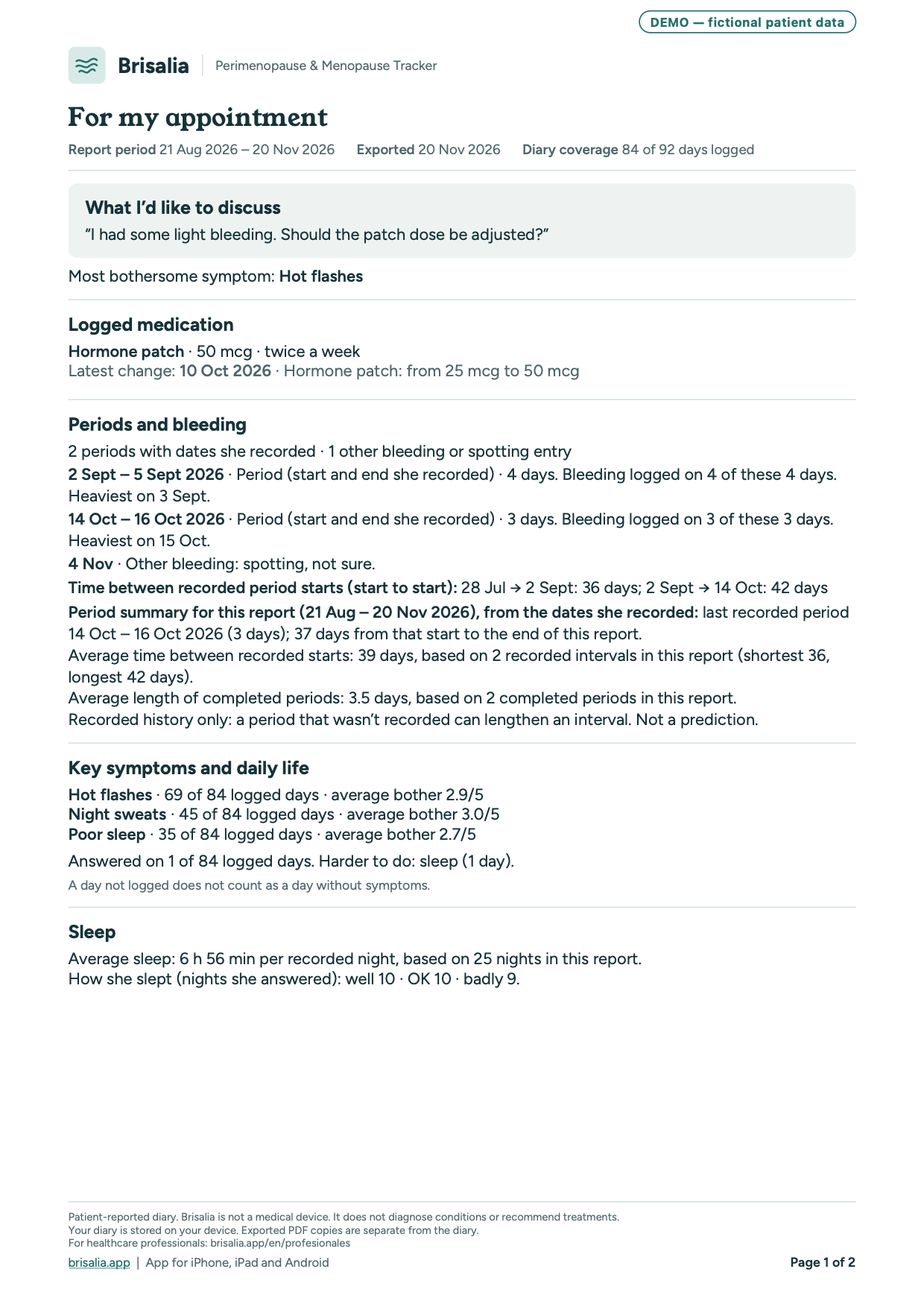
Yes: download the sample report (PDF), with demo data.
Which patients is it for?
Women in perimenopause and after menopause, in any situation: regular or irregular periods, no periods, after a hysterectomy or ovarian surgery, with an IUD, contraception or hormone therapy.
What does it cost my patient?
The report for the appointment is free and unlimited, covering the last 3 months. Premium is optional and adds, among other things, reports for any period and a treatment-review PDF: the before and after of each treatment change she selects, with her questions first.
Which phones and languages does it support?
On iPhone and Android. Health connections and some features depend on your phone's system and permissions. Version 1.1.0 supports Spanish, English, French, Italian and German. Check the version and availability in your local store; that store shows your price and offers.
Do I need to register as a professional?
No. Just recommend the app to your patient and ask her to bring you the report.
Is there evidence that logging symptoms helps?
There are external studies; neither evaluated Brisalia. In a randomized trial (n = 100), women who logged their symptoms daily for two weeks reported 42% fewer physical symptoms, compared with 12% in the control group (Andrews et al., Menopause, 2023). In a primary-care study, only 4 of 35 patients voiced everything they had come to discuss (Barry et al., BMJ, 2000).
Does Brisalia diagnose or give medical advice?
No. It is a symptom diary: it records what your patient logs and summarizes it in a report, without diagnosing or suggesting treatments. Clinical assessment is always yours.
Is it clinically validated?
Brisalia is not a diagnostic test or a validated scale: it is a daily record of what your patient logs. It doesn't replace your examination or any scales you use; it gives you day-by-day data instead of recollection.
Where is my patient's data stored?
On her phone. She needs no account and we don't receive her data. You only see the report she chooses to send you.
Do you have commercial ties with professionals or brands?
No. We don't pay or reward professionals for recommending Brisalia, it has no ads and we don't sell products or supplements.
Who is behind Brisalia?
Brisalia is a brand of Ctrl Zed LLC. The general information in the app comes from official sources such as MedlinePlus, the NHS and NICE, and each tip links to its source. How we check Brisalia →
Can I suggest changes to the report?
Yes, it helps us a lot. Write to us at hola@brisalia.app.
Version 1.1.0: logging and preparing for your appointment
This guide describes version 1.1.0 (Build 25). Check your installed version: new features require the update, whose availability depends on your store. The interface adapts to iPhone, iPad, Android phones and Android tablets.
Periods: recorded starts, ends and dates
In Log period you can record when it started, whether it is ongoing or when it ended, and correct past dates. Days marked as a period, bleeding outside a period and spotting stay separate. Leaving days unlogged never invents an end date.
The summary shows your last recorded period, days since its start and, when there are enough records, average completed period length and intervals between starts. Only explicitly recorded start dates count towards intervals. The average, shortest and longest interval require at least two intervals; average period length requires two completed periods. Sample counts are shown. This is recorded history, not a prediction or medical assessment.
Optional sleep, with or without a watch
Record sleep quality and duration without Health or a watch; either answer can be left blank. Sleep belongs to the day you wake up. Missing information is unknown, not zero. Appointment and Premium reports can include a sleep summary for the chosen period: entered duration takes priority; if absent, available Health duration is used, never added to it. Steps remain in the app, outside these PDFs. Treatment Review does not add this sleep block.
Medication, supplements and water
Add each medication or supplement as a separate item. With a weekly reminder on, choose one weekday for once weekly or two for twice weekly; saving without a reminder is also allowed. When I need it schedules no dose reminders. Manual water logging is free and needs no Health connection; water reminders are Premium.
Appointment and Premium reports: one to three pages
The report uses one page when it fits, two or three when needed, without cutting content. If your selection exceeds the limit, reduce it before sharing. Appointment reports for the last three months are free, with no limit on how many you create; Premium adds earlier date ranges and reviews of each treatment change. The preview tells you where selected notes begin: check every page. Only ticked notes are included; leaving one unticked does not delete it from your diary.
Current examples with fictional data
PDFs generated by the app with fictional data and DEMO on every page. The first image shows page 1 only: open the complete file. These examples do not predict your cycle or establish that treatment caused a change.