Perimenopause & menopause tracker
Arrive at your gynecologist with clear answers, not vague memories.
Your perimenopause and menopause diary. Log symptoms and changes, period start and end dates, optional sleep, medication and supplements. Prepare a clear PDF for your appointment, including only the notes you choose to share.
Download on the App Store Get it on Google Play
Your diary is stored on your device No account No ads Connects with Apple Health or Health Connect (compatible watches) For perimenopause and menopause

You're not the only one.
Hot flashes, insomnia and brain fog are lived in silence far too often. Brisalia helps you see how your symptoms change and tell your doctor with data.
Does any of this sound familiar?
"I wake up at 4am drenched"
"I walk into a room and forget why"
"My period follows no calendar anymore"
"A hot flash in the middle of a meeting"
"I'm irritable and don't know why"
"At the doctor's I forget half of it"
These are very common changes at this stage. Logging them every day helps you see how they change and explain them to your doctor.
1 minute · No sign-up
Free perimenopause & menopause symptom summary
- Your main symptoms
- General tips with official sources
- When it's worth talking to your doctor
It isn't a diagnosis.
How it works
Three steps, nothing complicated
For irregular periods, no periods, after surgery, on contraception or on hormone therapy.
Real screens from the app, not drawings. We never receive your health records: no account, no servers.
Logging and making your report are free. Premium adds a weekly review and a review of each treatment change.
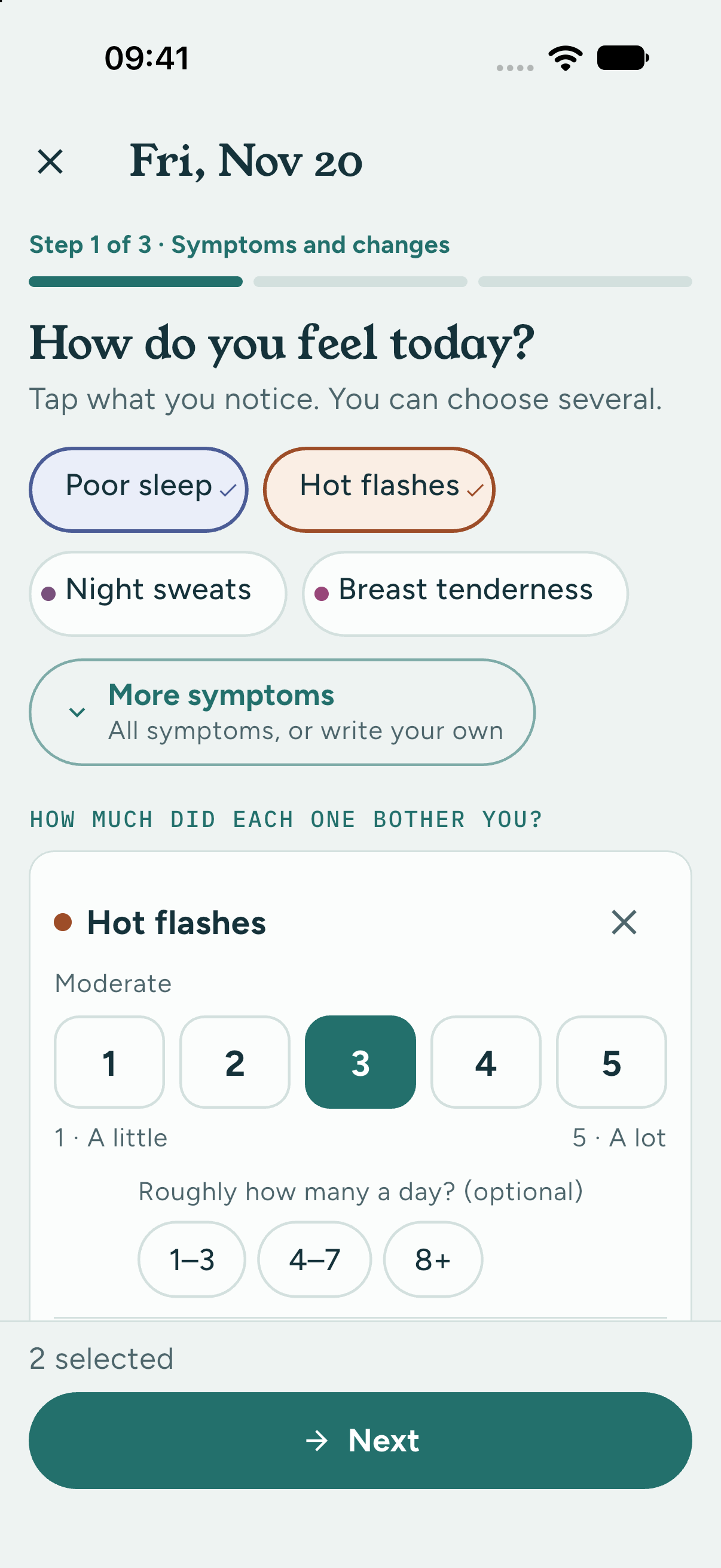
Track.
Symptoms and changes
Log symptoms in clear steps. Sleep is optional; you do not need a watch.
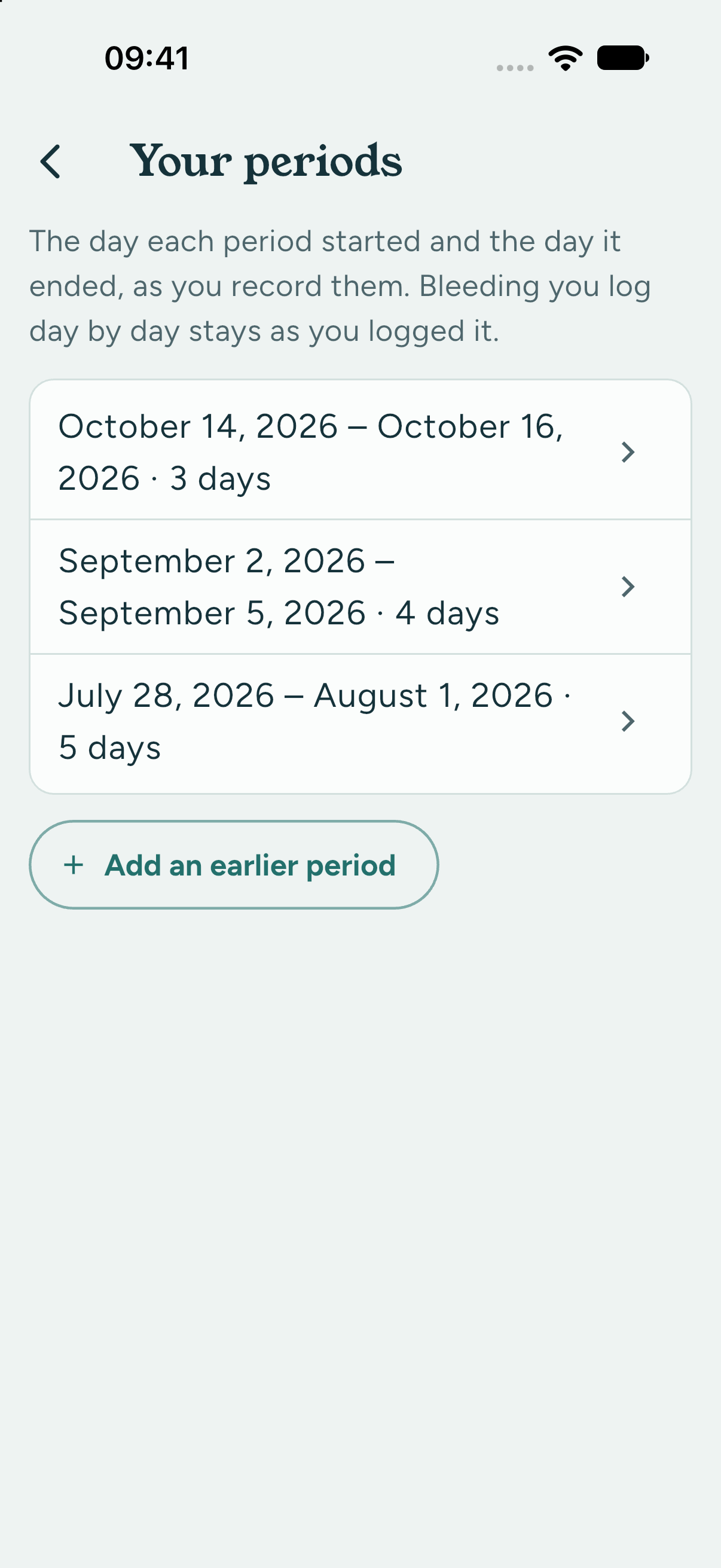
Understand.
Your recorded periods
Keep the start and end dates you entered. Summaries describe your records, not your next period.
Prepare.
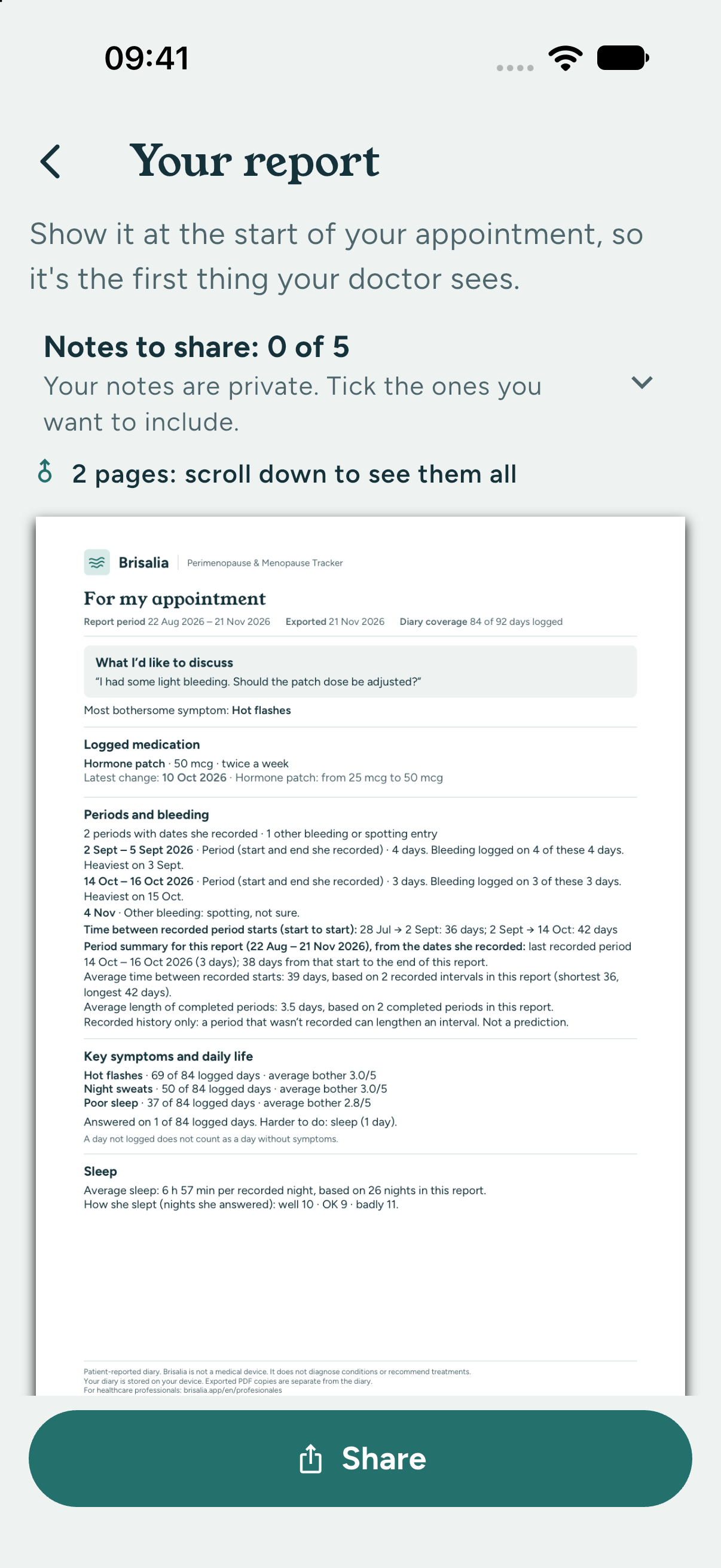
Prepare for your appointment
A report with recorded dates and data; notes are shared only when ticked. One to three pages depending on the content.
Version 1.1.0 supports Spanish, English, French, Italian and German. Check the version and availability in your local store; that store shows your price and offers.
The report
A symptom report designed for a quick read
Brisalia doesn't diagnose or recommend treatments. It organizes what you logged so the conversation with your doctor starts from the facts. It's designed to help your doctor review what you recorded.
- A summary on the first page, which your doctor reads first
- Your symptoms and how they've changed
- Your bleeding, with dates and details
- Your treatment and doses, before and after
- Your questions for the appointment
- Free for the last 3 months; any period with Premium
- Send it by WhatsApp or email, or print it
A real report made by the app with demo data, ready to send to your doctor.
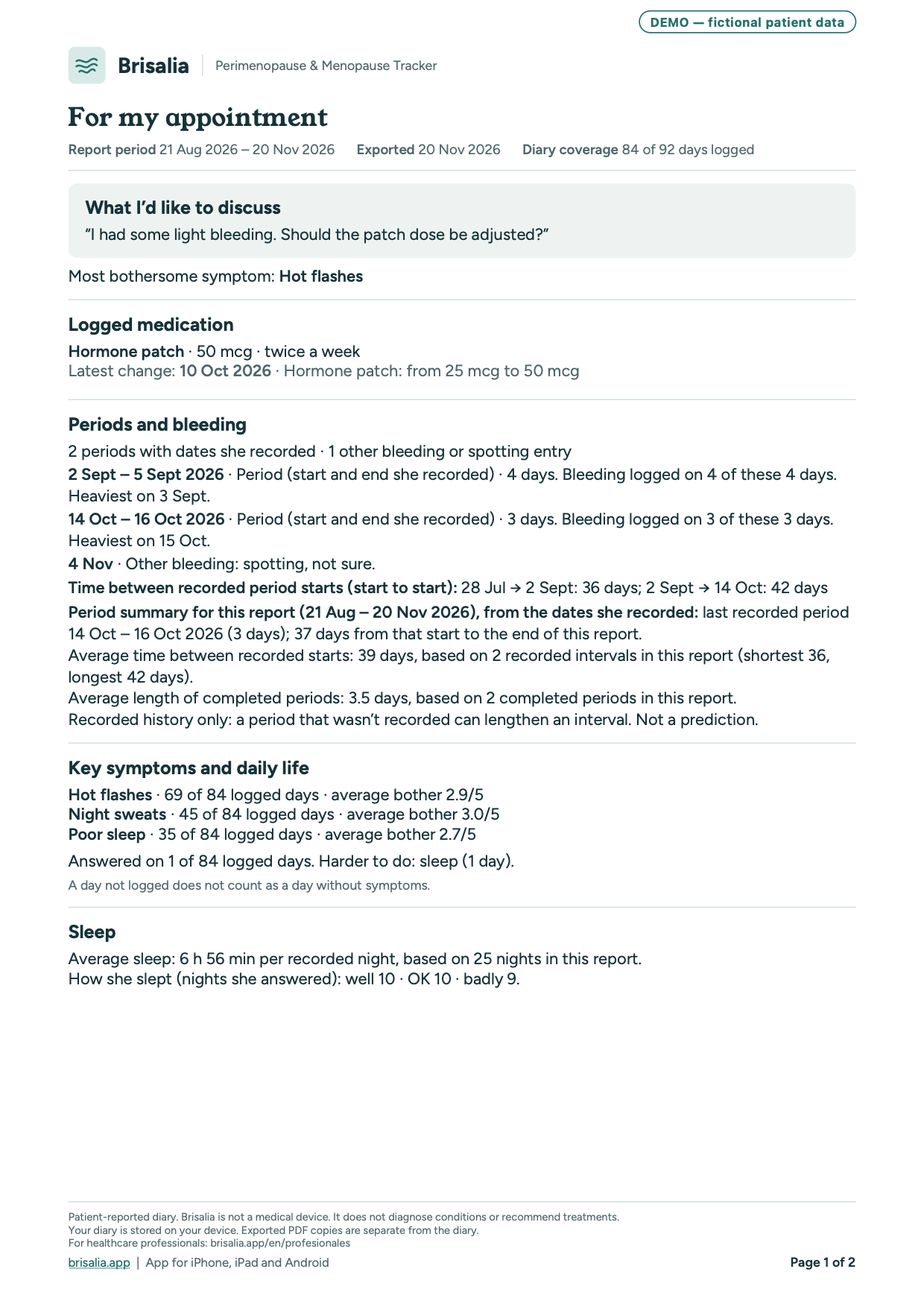
Gynecologist, GP or midwife? Her symptoms day by day, not from memory, with her main concern first. Free for her, nothing to install.
Privacy
Your data, yours alone.
Many health apps keep your data on their servers. Brisalia doesn't: no account, no servers, and no tracking or analytics.
- Your data stays on your phoneWe never receive your health records. You decide what to share: reports, exports, your phone's backups and any Apple Health or Health Connect connection stay under your control and their own settings.
- No accountNo email, no password.
- No adsFunded by subscriptions.
- We never sell or share your dataNot with insurers or anyone.
- Lock it if you likeWith Face ID, your fingerprint or your phone's passcode. No new passwords.
- Delete your records whenever you wantFrom Settings. We don't keep any copy.
Pricing
Free to start. Private always.
The essentials are free: Brisalia is a free menopause app to start with. Premium helps you review what changed and prepare for your appointments, and your data stays on your phone either way.
Brisalia
€0 free version
- Daily symptom log
- Monthly calendar
- Unlimited reports for your appointment (last 3 months), with a summary on the first page for your doctor
- In your report, the before and after of your latest treatment change, and the doses you logged as taken
- Guided breathing
- Your whole diary, always readable, with no date limit
- Medication and hormone therapy log, with reminders
- Watch connection (Apple Health or Health Connect)
- Good-practice articles
- Save points for your next appointment and keep your own note of what was agreed afterwards
Brisalia Premium
To review what changed and prepare for your appointments.
€19.99 / year
or €3.99 a month · VAT included · Spain pricing; elsewhere, your store's price
Eligible new subscribers can get the first month free on the yearly plan, then €19.99/year (Spain price). Renews automatically unless cancelled in the App Store or Google Play.
- Prepare your next review: review any treatment change, including ones you've stopped. Pick the changes, see the weeks before and after, write your questions and make a review PDF
- See what changed this week: between appointments, a short look at the symptoms you chose, without reading every day (your first one is free)
- Reports for any period
- Week-by-week trends for each symptom
- Follow-up between appointments: choose symptoms to track, save your review date with a reminder and include it in your report
- My patterns: what repeats in your log, always with the day counts
- Water reminders
Download on the App Store Get it on Google Play
Prices in euros. Outside the eurozone you'll see the price in your currency in the App Store or Google Play.
Questions
Your questions, clearly answered.
What makes Brisalia different?
Your data stays on your phone: no account, and we receive nothing. First created in Spanish for Spain and Latin America; also in English today, and version 1.1.0 adds French, Italian and German. A report designed for your doctor: a summary on the first page with your symptoms, bleeding and treatment, before and after, free and unlimited. For every situation: irregular periods, no periods, after surgery, with an IUD, contraception or hormone therapy; it isn't a period app trying to predict your cycle. No ads or tracking, and no products or supplements for sale.
Do I need to be in menopause already to use it?
No. It helps from the first changes, during perimenopause, and after menopause too.
What can I log?
More than 40 symptoms and how much they affect you (including changes you notice in your body, such as “Acne / breakouts” or “Breast size changes”), your periods or bleeding, your treatment with the exact dose and the doses you take, your notes and, if you like, your sleep and steps from your watch.
Speak to a healthcare professional about any new breast change; don’t assume it is caused by menopause.
Is it free? What does the free version include?
Yes. The free version includes the daily log, your whole diary with no date limit, your medication with doses and reminders, the before and after of your treatment, the watch connection, the articles, guided breathing and reports for your appointment covering the last 3 months, unlimited. Premium helps you review and prepare for your appointments: a review of each treatment change (on screen and as a PDF), a weekly summary of what you logged, reports for any period, trends, your patterns and water reminders. If you cancel Premium, you keep everything you've logged, your questions for the appointment and your medication reminders.
Where is it available?
On iPhone (App Store) and Android (Google Play). Health connections and some features depend on your phone's system and permissions. Version 1.1.0 supports Spanish, English, French, Italian and German. Check the version and availability in your local store; that store shows your price and offers. Check availability in your local store. You'll see the price in your store's currency before you pay.
Does it work with my watch?
Yes, and it's optional. Brisalia reads your sleep and steps and shows them next to your symptoms in the app; sleep also appears in your report. On iPhone, through Apple Health: Apple Watch, Garmin, Fitbit and other watches or rings that save data to Health. The symptoms you log also appear in the Health app's menopause tracking, and anything you already logged in Health can be imported without duplicates. On Android, through Health Connect: Galaxy Watch, Fitbit, Pixel Watch and other watches that save data to Health Connect. Brisalia doesn't send this data to us; your watch app, Apple Health and Health Connect keep it under their own settings. The app works just the same without a watch. How to connect your Apple Watch
Who is behind Brisalia?
Brisalia is a brand of Ctrl Zed LLC. The general information in the app comes from official sources such as MedlinePlus, the UK NHS and NICE, and each article links to its source. You can write to us at hola@brisalia.app.
What is perimenopause, and how is it different from menopause?
Perimenopause is the transition: hormones change, periods become irregular and symptoms may appear. Menopause is when you have gone 12 months in a row without a period. If you use hormonal contraception or a hormonal IUD, have had your womb removed, or take some treatments, your periods can change or stop for other reasons, and your doctor assesses it mainly from your symptoms. Source: Read more ↗
At what age does it start, and how long does it last?
Menopause usually happens between 45 and 55, and changes can start several years earlier. Symptoms usually last 7 to 9 years, sometimes longer, and can change over time. Source: Read more ↗ · Read more ↗
What are the most common symptoms?
Period changes, hot flashes, night sweats, trouble sleeping, mood changes or anxiety, brain fog (memory or concentration problems), joint pain, vaginal dryness and lower sex drive. Not every woman has all of them. Source: Read more ↗
When should I talk to my doctor?
If you think you have menopause symptoms and want to know your options; if they start before 45; if you still have periods but are bleeding more than before; or if you have any bleeding after 12 months without a period, even a little: that last one, without waiting. This is general information: your doctor is the one who can assess your case. Source: Read more ↗ · Read more ↗
Can Brisalia tell me if I'm in perimenopause?
No. Only your doctor can assess that. Brisalia helps you log your symptoms and how they change over time, so you can show her clearly at your appointment. More in our guide Am I in perimenopause?
Why log my symptoms?
So your doctor sees daily data, not memories: in otherwise healthy women aged 45 or older with symptoms, perimenopause is usually assessed mainly from symptoms and how they change (NICE guideline NG23).
How long should I log before my appointment?
Ideally 4 to 12 weeks, so you can see how your symptoms change. But if they affect you a lot, don't wait to book: bring what you have.
Does it work if I have no periods, had a hysterectomy or have an IUD?
Yes. In the app you set your situation: regular or irregular periods, no periods, after surgery (hysterectomy, ovaries, ablation) or with a hormonal IUD. Brisalia adapts and doesn't assume a monthly period.
Does it work if I take hormone therapy or contraception?
Yes. You log your treatment with the exact dose and every change, and you can check off the doses you take. The report shows how you were before starting and how you are now, which is very useful for your review with your doctor. If you haven't started yet, start logging today, and never delay a treatment to log. With at least a week logged before you start, the report compares before and after; if not, it compares your first weeks on it with the latest ones.
Should I wait for my appointment if something worries me?
No. Logging should never delay care: if you have bleeding or symptoms that worry you, see a doctor without waiting for your appointment. And if you have any bleeding after 12 months without a period, even a little, see a doctor soon.
How do I show the report to my doctor?
With one tap you create a PDF and send it by WhatsApp or email, print it, or share it the way your clinic accepts. Your doctor doesn't need to install anything.
Does Brisalia give medical advice?
No. Brisalia is a symptom diary with general information. It doesn't diagnose or recommend treatments. It helps you reach your doctor with clear data.
Does Brisalia recommend treatments or supplements?
No. We don't sell products or supplements and we don't recommend treatments. Decisions about your treatment are made with your doctor.
Can I talk to a doctor in the app?
No. Brisalia doesn't offer medical consultations or chat with professionals. It helps you get more out of your appointment with your own doctor, with your symptoms logged and a clear report.
Do I need to create an account or give my email?
No. Brisalia has no accounts: you open the app and start logging. We don't ask for your name, email or phone number. If you subscribe to Premium, you pay with your App Store or Google Play account, like any other app.
Who can see my data?
Your diary is stored on your phone. Brisalia has no server for your health data, so we never receive your symptoms or keep a copy. Your doctor only sees the report you choose to send. If you connect Apple Health or Health Connect, what Brisalia saves there (symptoms, water) and what your watch records are kept by those services under their own settings, which can include cloud sync (for example, Apple Health with iCloud). On iPhone, Brisalia's own diary isn't included in iCloud backup. On Android, Google's backup can include it, depending on your settings: that copy is yours and lives in your Google account.
What happens to my data if I change phones?
From Settings you can save a backup wherever you choose and restore it on your new phone. The backup is encrypted with a password you choose: you need it to restore the backup, and if you forget it, we can't recover it. On iPhone, this backup is how your diary moves, because it isn't included in iCloud backup. On Android, Google's backup can also move it to your new phone, depending on your settings. We don't keep any copy, so the backup is yours alone.
How do I delete all my data?
From Settings › Your data › Delete all my data. Everything you've logged on that phone is deleted, and we have no copy. Backups you've saved (Brisalia's or your phone's), reports or files you've exported or sent, and records Brisalia saved to Apple Health or Health Connect (symptoms, water) aren't deleted: you can remove them there yourself.
Can I lock the app?
Yes, if you like. Go to Settings › Your data › Lock Brisalia. It uses your phone's own lock: Face ID, Touch ID or your passcode on iPhone; your fingerprint, face or screen lock on Android. There's no password of ours to forget. The app asks when you open it and after more than a minute away, and nothing you've logged shows in the app switcher.
Can I download all my data?
Yes, for free. In Settings › Your data you can export everything you've logged, from every date, as a spreadsheet that opens in Excel, Numbers or Google Sheets. Those files aren't encrypted, so only share them with people you choose. To move to a new phone, use the backup instead, which is encrypted with your password.
Does it work without internet?
Yes. Logging, viewing your calendar, creating the report and reading the articles all work offline, because everything is on your phone. You only need internet to send the report, open the articles' sources or manage your subscription.
How much does Premium cost?
The free version never expires and includes the report for your appointment covering the last 3 months. Premium costs €19.99 a year or €3.99 a month, VAT included (Spain's price). Eligible new subscribers can get the first month free on the yearly plan, then €19.99/year. Renews automatically unless cancelled. In other countries you'll see the price in your store's currency (in some, US dollars) before you pay.
How does the free Premium month work?
You start it yourself in the app, with the yearly plan, through the App Store or Google Play. The offer is available only when the App Store or Google Play confirms you are eligible (for example, if you've had a trial or a subscription before, it may not be offered). Nothing is charged for one month. The app is designed to remind you well ahead of the first charge (about 20 days before), with a notification if you have them turned on and a card on Today, though this depends on your permissions and the information the store provides; on Android the date it shows is approximate, and the exact date and amount are in Google Play. You can cancel from the App Store or Google Play subscription settings; Apple recommends doing it at least 24 hours before the trial ends. If you don't cancel, your year of Premium starts (€19.99 in Spain; elsewhere, the price your store shows). If you cancel, Premium usually stays active until the free month ends, depending on the store; then you're on the free version and everything you've logged stays on your phone.
How does the free weekly review work?
The weekly review is a Premium feature, but your first one is free: it appears once you've logged at least 4 days in each of two weeks in a row. Until then, the app shows an example with made-up data. It's separate from the free month on the yearly plan, which you start yourself in the App Store or Google Play.
How do I cancel Premium?
Whenever you like, from the subscription settings in the App Store or Google Play. You keep Premium until the end of the paid period, then the free version with everything you've logged. Your medication reminders keep working. Deleting the app doesn't cancel the subscription. On iPhone, Apple can take a while to report a recent cancellation, so Brisalia may keep showing the previous renewal for a while; Manage subscription has your current details.
Does Brisalia diagnose or give medical advice?
No. It is a symptom diary: it records what your patient logs and summarizes it in a report, without diagnosing or suggesting treatments. Clinical assessment is always yours.
Where is my patient's data stored?
On her phone. She needs no account and we don't receive her data. You only see the report she chooses to send you.
What is the report based on?
It summarises what she logged: her symptoms and how much they affect her, her bleeding pattern and her treatment, with how she was before starting and how she is now. For clinical guidance, NICE NG23 and the British Menopause Society are useful further reading. Brisalia is not endorsed by or associated with NICE or the British Menopause Society.
What does it cost my patient?
The report for the appointment is free and unlimited, covering the last 3 months. Premium is optional and adds, among other things, reports for any period and a treatment-review PDF: the before and after of each treatment change she selects, with her questions first.
Guides
Understand what you notice
Version 1.1.0: logging and preparing for your appointment
This guide describes version 1.1.0 (Build 25). Check your installed version: new features require the update, whose availability depends on your store. The interface adapts to iPhone, iPad, Android phones and Android tablets.
Periods: recorded starts, ends and dates
In Log period you can record when it started, whether it is ongoing or when it ended, and correct past dates. Days marked as a period, bleeding outside a period and spotting stay separate. Leaving days unlogged never invents an end date.
The summary shows your last recorded period, days since its start and, when there are enough records, average completed period length and intervals between starts. Only explicitly recorded start dates count towards intervals. The average, shortest and longest interval require at least two intervals; average period length requires two completed periods. Sample counts are shown. This is recorded history, not a prediction or medical assessment.
Optional sleep, with or without a watch
Record sleep quality and duration without Health or a watch; either answer can be left blank. Sleep belongs to the day you wake up. Missing information is unknown, not zero. Appointment and Premium reports can include a sleep summary for the chosen period: entered duration takes priority; if absent, available Health duration is used, never added to it. Steps remain in the app, outside these PDFs. Treatment Review does not add this sleep block.
Medication, supplements and water
Add each medication or supplement as a separate item. With a weekly reminder on, choose one weekday for once weekly or two for twice weekly; saving without a reminder is also allowed. When I need it schedules no dose reminders. Manual water logging is free and needs no Health connection; water reminders are Premium.
Appointment and Premium reports: one to three pages
The report uses one page when it fits, two or three when needed, without cutting content. If your selection exceeds the limit, reduce it before sharing. Appointment reports for the last three months are free, with no limit on how many you create; Premium adds earlier date ranges and reviews of each treatment change. The preview tells you where selected notes begin: check every page. Only ticked notes are included; leaving one unticked does not delete it from your diary.
Current examples with fictional data
PDFs generated by the app with fictional data and DEMO on every page. The first image shows page 1 only: open the complete file. These examples do not predict your cycle or establish that treatment caused a change.